
This article is translated from the Chinese original.
1. Keeping the account alive
- Since a Serv00 account will be reclaimed if you do not connect by SSH or log into the web panel for three months, you need to log in from time to time to avoid losing the account. Here I use a Cloudflare Worker to perform scheduled logins and send the login results through a Telegram bot.
- Worker code:
addEventListener('fetch', event => {  event.respondWith(handleRequest(event.request))})
addEventListener('scheduled', event => {  event.waitUntil(handleScheduled(event.scheduledTime))})
async function handleRequest(request) {  return new Response('Worker is running')}
async function handleScheduled(scheduledTime) {  const accounts = JSON.parse(ACCOUNTS_JSON)  const results = await loginAccounts(accounts)  await sendSummary(results)}
async function loginAccounts(accounts) {  const results = []  for (const account of accounts) {    const result = await loginAccount(account)    results.push({ ...account, ...result })    await delay(Math.floor(Math.random() * 8000) + 1000)  }  return results}
function generateRandomUserAgent() {  const browsers = ['Chrome', 'Firefox', 'Safari', 'Edge', 'Opera'];  const browser = browsers[Math.floor(Math.random() * browsers.length)];  const version = Math.floor(Math.random() * 100) + 1;  const os = ['Windows NT 10.0', 'Macintosh', 'X11'];  const selectedOS = os[Math.floor(Math.random() * os.length)];  const osVersion = selectedOS === 'X11' ? 'Linux x86_64' : selectedOS === 'Macintosh' ? 'Intel Mac OS X 10_15_7' : 'Win64; x64';
  return `Mozilla/5.0 (${selectedOS}; ${osVersion}) AppleWebKit/537.36 (KHTML, like Gecko) ${browser}/${version}.0.0.0 Safari/537.36`;}
async function loginAccount(account) {  const { username, password, panelnum, type } = account  let url = type === 'ct8'    ? 'https://panel.ct8.pl/login/?next=/'    : `https://panel${panelnum}.serv00.com/login/?next=/`
  const userAgent = generateRandomUserAgent();
  try {    const response = await fetch(url, {      method: 'GET',      headers: {        'User-Agent': userAgent,      },    })
    const pageContent = await response.text()    const csrfMatch = pageContent.match(/name="csrfmiddlewaretoken" value="([^"]*)"/)    const csrfToken = csrfMatch ? csrfMatch[1] : null
    if (!csrfToken) {      throw new Error('CSRF token not found')    }
    const initialCookies = response.headers.get('set-cookie') || ''
    const formData = new URLSearchParams({      'username': username,      'password': password,      'csrfmiddlewaretoken': csrfToken,      'next': '/'    })
    const loginResponse = await fetch(url, {      method: 'POST',      headers: {        'Content-Type': 'application/x-www-form-urlencoded',        'Referer': url,        'User-Agent': userAgent,        'Cookie': initialCookies,      },      body: formData.toString(),      redirect: 'manual'    })
    console.log(`Login response status: ${loginResponse.status}`)    console.log(`Login response headers: ${JSON.stringify(Object.fromEntries(loginResponse.headers))}`)
    const loginResponseBody = await loginResponse.text()    console.log(`Login response body: ${loginResponseBody.substring(0, 200)}...`)
    if (loginResponse.status === 302 && loginResponse.headers.get('location') === '/') {      const loginCookies = loginResponse.headers.get('set-cookie') || ''      const allCookies = combineCookies(initialCookies, loginCookies)
      const dashboardResponse = await fetch(url.replace('/login/', '/'), {        headers: {          'Cookie': allCookies,          'User-Agent': userAgent,        }      })      const dashboardContent = await dashboardResponse.text()      console.log(`Dashboard content: ${dashboardContent.substring(0, 200)}...`)
      if (dashboardContent.includes('href="/logout/"') || dashboardContent.includes('href="/wyloguj/"')) {        const nowUtc = formatToISO(new Date())        const nowBeijing = formatToISO(new Date(Date.now() + 8 * 60 * 60 * 1000))        const message = `账号 ${username} (${type}) 于北京时间 ${nowBeijing}(UTC时间 ${nowUtc})登录成功!`        console.log(message)        await sendTelegramMessage(message)        return { success: true, message }      } else {        const message = `账号 ${username} (${type}) 登录后未找到登出链接,可能登录失败。`        console.error(message)        await sendTelegramMessage(message)        return { success: false, message }      }    } else if (loginResponseBody.includes('Nieprawidłowy login lub hasło')) {      const message = `账号 ${username} (${type}) 登录失败:用户名或密码错误。`      console.error(message)      await sendTelegramMessage(message)      return { success: false, message }    } else {      const message = `账号 ${username} (${type}) 登录失败,未知原因。请检查账号和密码是否正确。`      console.error(message)      await sendTelegramMessage(message)      return { success: false, message }    }  } catch (error) {    const message = `账号 ${username} (${type}) 登录时出现错误: ${error.message}`    console.error(message)    await sendTelegramMessage(message)    return { success: false, message }  }}
function combineCookies(cookies1, cookies2) {  const cookieMap = new Map()
  const parseCookies = (cookieString) => {    cookieString.split(',').forEach(cookie => {      const [fullCookie] = cookie.trim().split(';')      const [name, value] = fullCookie.split('=')      if (name && value) {        cookieMap.set(name.trim(), value.trim())      }    })  }
  parseCookies(cookies1)  parseCookies(cookies2)
  return Array.from(cookieMap.entries()).map(([name, value]) => `${name}=${value}`).join('; ')}
async function sendSummary(results) {  const successfulLogins = results.filter(r => r.success)  const failedLogins = results.filter(r => !r.success)
  let summaryMessage = '登录结果统计:\n'  summaryMessage += `成功登录的账号:${successfulLogins.length}\n`  summaryMessage += `登录失败的账号:${failedLogins.length}\n`
  if (failedLogins.length > 0) {    summaryMessage += '\n登录失败的账号列表:\n'    failedLogins.forEach(({ username, type, message }) => {      summaryMessage += `- ${username} (${type}): ${message}\n`    })  }
  console.log(summaryMessage)  await sendTelegramMessage(summaryMessage)}
async function sendTelegramMessage(message) {  const telegramConfig = JSON.parse(TELEGRAM_JSON)  const { telegramBotToken, telegramBotUserId } = telegramConfig  const url = `https://api.telegram.org/bot${telegramBotToken}/sendMessage`
  try {    await fetch(url, {      method: 'POST',      headers: { 'Content-Type': 'application/json' },      body: JSON.stringify({        chat_id: telegramBotUserId,        text: message      })    })  } catch (error) {    console.error('Error sending Telegram message:', error)  }}
function formatToISO(date) {  return date.toISOString().replace('T', ' ').replace('Z', '').replace(/\.\d{3}Z/, '')}
function delay(ms) { return new Promise(resolve => setTimeout(resolve, ms))}- Variables:
ACCOUNTS_JSON
[ { "username": "serv00user1", "password": "serv00password1", "panelnum": "0", "type": "serv00" }, { "username": "serv00user2", "password": "serv00password2", "panelnum": "4", "type": "serv00" }, { "username": "serv00user3", "password": "serv00password3", "panelnum": "7", "type": "serv00" }, { "username": "ct8user1", "password": "ct8password1", "type": "ct8" }, { "username": "ct8user2", "password": "ct8password2", "type": "ct8" }]TELEGRAM_JSON
{ "telegramBotToken": "YOUR_BOT_TOKEN", "telegramBotUserId": "YOUR_USER_ID"}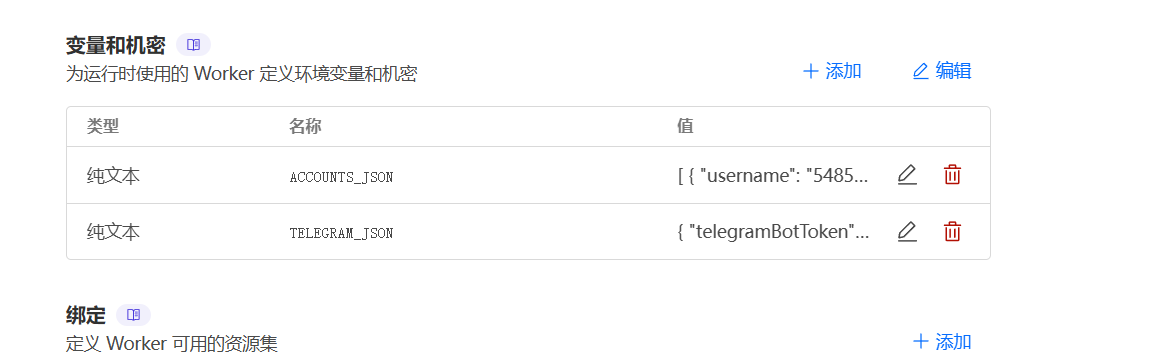
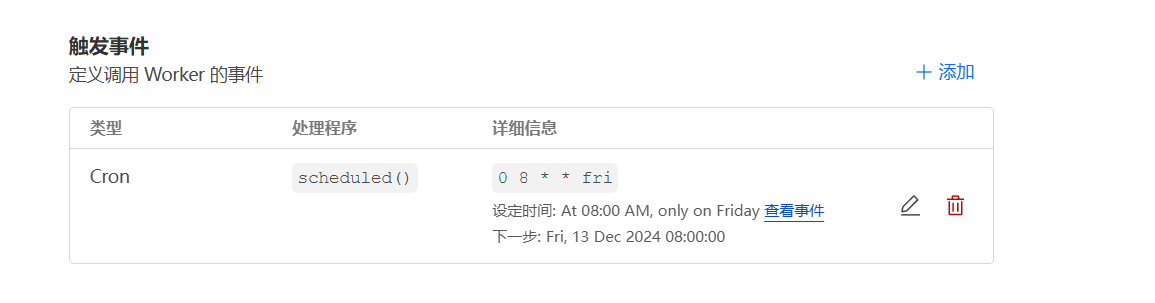
- Cron task settings
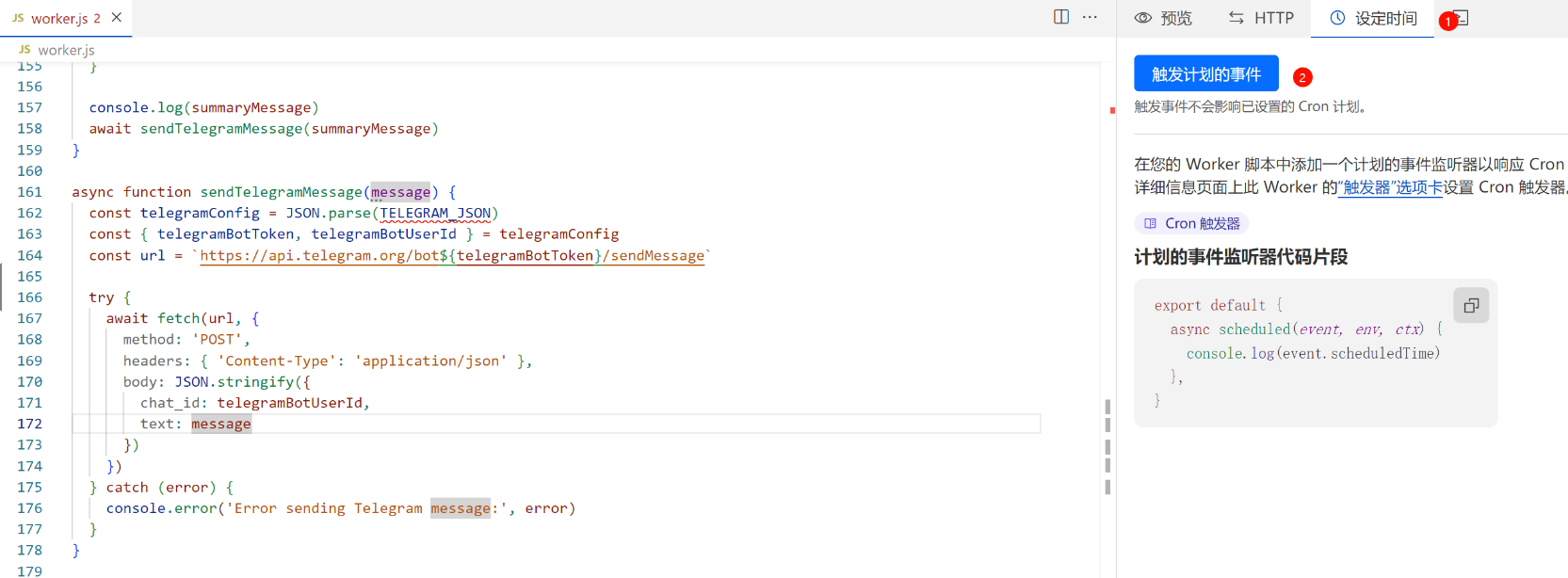
- Then trigger it once to see whether the login succeeds
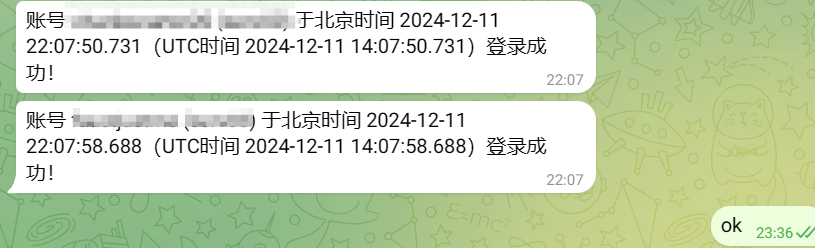
If Telegram successfully pushes the message, then it is working.
2. Keeping the process alive
- Serv00 may occasionally clear running processes and the cron jobs we configured. Re-adding cron jobs every time is annoying, so I use a script to add them with one click.
- Worker:
addEventListener('fetch', event => {  event.respondWith(handleRequest(event.request))})
addEventListener('scheduled', event => {  event.waitUntil(handleScheduled(event.scheduledTime))})
async function handleRequest(request) {  const url = new URL(request.url)
  if (url.pathname === '/login' && request.method === 'POST') {    const formData = await request.formData()    const password = formData.get('password')
    if (password === PASSWORD) {      const response = new Response(JSON.stringify({ success: true }), {        headers: { 'Content-Type': 'application/json' }      })      response.headers.set('Set-Cookie', `auth=${PASSWORD}; HttpOnly; Secure; SameSite=Strict; Path=/; Max-Age=86400`)      return response    } else {      return new Response(JSON.stringify({ success: false }), {        headers: { 'Content-Type': 'application/json' }      })    }  } else if (url.pathname === '/run' && request.method === 'POST') {    if (!isAuthenticated(request)) {      return new Response('Unauthorized', { status: 401 })    }
    await handleScheduled(new Date().toISOString())    const results = await CRON_RESULTS.get('lastResults', 'json')    return new Response(JSON.stringify(results), {      headers: { 'Content-Type': 'application/json' }    })  } else if (url.pathname === '/results' && request.method === 'GET') {    if (!isAuthenticated(request)) {      return new Response(JSON.stringify({ authenticated: false }), {        headers: { 'Content-Type': 'application/json' }      })    }    const results = await CRON_RESULTS.get('lastResults', 'json')    return new Response(JSON.stringify({ authenticated: true, results: results || [] }), {      headers: { 'Content-Type': 'application/json' }    })  } else if (url.pathname === '/check-auth' && request.method === 'GET') {    return new Response(JSON.stringify({ authenticated: isAuthenticated(request) }), {      headers: { 'Content-Type': 'application/json' }    })  } else {    // 显示登录页面或结果页面的 HTML    return new Response(getHtmlContent(), {      headers: { 'Content-Type': 'text/html' },    })  }}
function isAuthenticated(request) {  const cookies = request.headers.get('Cookie')  if (cookies) {    const authCookie = cookies.split(';').find(c => c.trim().startsWith('auth='))    if (authCookie) {      const authValue = authCookie.split('=')[1]      return authValue === PASSWORD    }  }  return false}
function getHtmlContent() {  return `  <!DOCTYPE html>  <html lang="en">  <head>    <meta charset="UTF-8">    <meta name="viewport" content="width=device-width, initial-scale=1.0">    <title>Worker Control Panel</title>    <style>      body {        font-family: Arial, sans-serif;        display: flex;        justify-content: center;        align-items: center;        min-height: 100vh;        margin: 0;        background-color: #f0f0f0;      }      .container {        text-align: center;        padding: 20px;        background-color: white;        border-radius: 8px;        box-shadow: 0 2px 4px rgba(0,0,0,0.1);        max-width: 800px;        width: 100%;      }      input, button {        margin: 10px 0;        padding: 10px;        width: 200px;        border-radius: 4px;        border: 1px solid #ddd;      }      button {        background-color: #4CAF50;        border: none;        color: white;        cursor: pointer;      }      #status {        margin-top: 20px;        font-weight: bold;      }      table {        width: 100%;        border-collapse: collapse;        margin-top: 20px;      }      th, td {        border: 1px solid #ddd;        padding: 8px;        text-align: left;      }      th {        background-color: #f2f2f2;      }      #loginForm, #dashboard {        display: none;      }    </style>  </head>  <body>    <div class="container">      <h1>Worker Control Panel</h1>      <div id="loginForm">        <input type="password" id="password" placeholder="Enter password">        <button onclick="login()">Login</button>      </div>      <div id="dashboard">        <button onclick="runScript()">Run Script</button>        <div id="status"></div>        <table id="resultsTable">          <thead>            <tr>              <th>Account</th>              <th>Type</th>              <th>Status</th>              <th>Message</th>              <th>Last Run</th>            </tr>          </thead>          <tbody></tbody>        </table>      </div>    </div>    <script>      let password = '';
      function showLoginForm() {        document.getElementById('loginForm').style.display = 'block';        document.getElementById('dashboard').style.display = 'none';      }
      function showDashboard() {        document.getElementById('loginForm').style.display = 'none';        document.getElementById('dashboard').style.display = 'block';        fetchResults();      }
      async function checkAuth() {        const response = await fetch('/check-auth');        const data = await response.json();        if (data.authenticated) {          showDashboard();        } else {          showLoginForm();        }      }
      async function login() {        password = document.getElementById('password').value;        const formData = new FormData();        formData.append('password', password);        const response = await fetch('/login', {          method: 'POST',          body: formData        });        const result = await response.json();        if (result.success) {          showDashboard();        } else {          alert('Incorrect password');        }      }
      async function runScript() {        const statusDiv = document.getElementById('status');        statusDiv.textContent = 'Executing script...';        try {          const response = await fetch('/run', { method: 'POST' });          if (response.ok) {            const results = await response.json();            displayResults(results);            statusDiv.textContent = 'Script executed successfully!';          } else if (response.status === 401) {            statusDiv.textContent = 'Unauthorized. Please login again.';            showLoginForm();          } else {            statusDiv.textContent = 'Error executing script.';          }        } catch (error) {          statusDiv.textContent = 'Error: ' + error.message;        }      }
      async function fetchResults() {        try {          const response = await fetch('/results');          if (response.ok) {            const data = await response.json();            if (data.authenticated) {              displayResults(data.results);            } else {              showLoginForm();            }          } else {            console.error('Failed to fetch results');            showLoginForm();          }        } catch (error) {          console.error('Error fetching results:', error);          showLoginForm();        }      }
      function displayResults(results) {        const tbody = document.querySelector('#resultsTable tbody');        tbody.innerHTML = '';        results.forEach(result => {          result.cronResults.forEach((cronResult, index) => {            const row = tbody.insertRow();            if (index === 0) {              row.insertCell(0).textContent = result.username;              row.insertCell(1).textContent = result.type;            } else {              row.insertCell(0).textContent = '';              row.insertCell(1).textContent = '';            }            row.insertCell(2).textContent = cronResult.success ? 'Success' : 'Failed';            row.insertCell(3).textContent = cronResult.message;            row.insertCell(4).textContent = new Date(result.lastRun).toLocaleString();          });        });      }
      // 页面加载时检查认证状态      document.addEventListener('DOMContentLoaded', checkAuth);    </script>  </body>  </html>  `;}
async function handleScheduled(scheduledTime) {  const accountsData = JSON.parse(ACCOUNTS_JSON);  const accounts = accountsData.accounts;
  let results = [];  for (const account of accounts) {    const result = await loginAccount(account);    results.push(result);    await delay(Math.floor(Math.random() * 8000) + 1000);  }
  // 保存结果到 KV 存储  await CRON_RESULTS.put('lastResults', JSON.stringify(results));}
function generateRandomUserAgent() {  const browsers = ['Chrome', 'Firefox', 'Safari', 'Edge', 'Opera'];  const browser = browsers[Math.floor(Math.random() * browsers.length)];  const version = Math.floor(Math.random() * 100) + 1;  const os = ['Windows NT 10.0', 'Macintosh', 'X11'];  const selectedOS = os[Math.floor(Math.random() * os.length)];  const osVersion = selectedOS === 'X11' ? 'Linux x86_64' : selectedOS === 'Macintosh' ? 'Intel Mac OS X 10_15_7' : 'Win64; x64';
  return `Mozilla/5.0 (${selectedOS}; ${osVersion}) AppleWebKit/537.36 (KHTML, like Gecko) ${browser}/${version}.0.0.0 Safari/537.36`;}
async function loginAccount(account) {  const { username, password, panelnum, type, cronCommands } = account  let baseUrl = type === 'ct8'    ? 'https://panel.ct8.pl'    : `https://panel${panelnum}.serv00.com`  let loginUrl = `${baseUrl}/login/?next=/cron/`
  const userAgent = generateRandomUserAgent();
  try {    const response = await fetch(loginUrl, {      method: 'GET',      headers: {        'User-Agent': userAgent,      },    })
    const pageContent = await response.text()    const csrfMatch = pageContent.match(/name="csrfmiddlewaretoken" value="([^"]*)"/)    const csrfToken = csrfMatch ? csrfMatch[1] : null
    if (!csrfToken) {      throw new Error('CSRF token not found')    }
    const initialCookies = response.headers.get('set-cookie') || ''
    const formData = new URLSearchParams({      'username': username,      'password': password,      'csrfmiddlewaretoken': csrfToken,      'next': '/cron/'    })
    const loginResponse = await fetch(loginUrl, {      method: 'POST',      headers: {        'Content-Type': 'application/x-www-form-urlencoded',        'Referer': loginUrl,        'User-Agent': userAgent,        'Cookie': initialCookies,      },      body: formData.toString(),      redirect: 'manual'    })
    if (loginResponse.status === 302 && loginResponse.headers.get('location') === '/cron/') {      const loginCookies = loginResponse.headers.get('set-cookie') || ''      const allCookies = combineCookies(initialCookies, loginCookies)
      // 访问 cron 列表页面      const cronListUrl = `${baseUrl}/cron/`      const cronListResponse = await fetch(cronListUrl, {        headers: {          'Cookie': allCookies,          'User-Agent': userAgent,        }      })      const cronListContent = await cronListResponse.text()
      console.log(`Cron list URL: ${cronListUrl}`)      console.log(`Cron list response status: ${cronListResponse.status}`)      console.log(`Cron list content (first 1000 chars): ${cronListContent.substring(0, 1000)}`)
      let cronResults = [];      for (const cronCommand of cronCommands) {        if (!cronListContent.includes(cronCommand)) {          // 访问添加 cron 任务页面          const addCronUrl = `${baseUrl}/cron/add`          const addCronPageResponse = await fetch(addCronUrl, {            headers: {              'Cookie': allCookies,              'User-Agent': userAgent,              'Referer': cronListUrl,            }          })          const addCronPageContent = await addCronPageResponse.text()
          console.log(`Add cron page URL: ${addCronUrl}`)          console.log(`Add cron page response status: ${addCronPageResponse.status}`)          console.log(`Add cron page content (first 1000 chars): ${addCronPageContent.substring(0, 1000)}`)
          const newCsrfMatch = addCronPageContent.match(/name="csrfmiddlewaretoken" value="([^"]*)"/)          const newCsrfToken = newCsrfMatch ? newCsrfMatch[1] : null
          if (!newCsrfToken) {            throw new Error('New CSRF token not found for adding cron task')          }
          const formData = new URLSearchParams({            'csrfmiddlewaretoken': newCsrfToken,            'spec': 'manual',            'minute_time_interval': 'on',            'minute': '15',            'hour_time_interval': 'each',            'hour': '*',            'day_time_interval': 'each',            'day': '*',            'month_time_interval': 'each',            'month': '*',            'dow_time_interval': 'each',            'dow': '*',            'command': cronCommand,            'comment': 'Auto added cron job'          })
          console.log('Form data being sent:', formData.toString())
          const { success, response: addCronResponse, content: addCronResponseContent } = await addCronWithRetry(addCronUrl, {            method: 'POST',            headers: {              'Content-Type': 'application/x-www-form-urlencoded',              'Cookie': allCookies,              'User-Agent': userAgent,              'Referer': addCronUrl,              'Origin': baseUrl,              'Accept': 'text/html,application/xhtml+xml,application/xml;q=0.9,image/webp,*/*;q=0.8',              'Accept-Language': 'en-US,en;q=0.5',              'Upgrade-Insecure-Requests': '1'            },            body: formData.toString(),          })
          console.log('Full response content:', addCronResponseContent)
          if (success) {            if (addCronResponseContent.includes('Cron job has been added') || addCronResponseContent.includes('Zadanie cron zostało dodane')) {              const message = `添加了新的 cron 任务:${cronCommand}`;              console.log(message);              await sendTelegramMessage(`账号 ${username} (${type}) ${message}`);              cronResults.push({ success: true, message });            } else {              // 如果响应中没有成功信息,再次检查cron列表              const checkCronListResponse = await fetch(cronListUrl, {                headers: {                  'Cookie': allCookies,                  'User-Agent': userAgent,                }              });              const checkCronListContent = await checkCronListResponse.text();
              if (checkCronListContent.includes(cronCommand)) {                const message = `确认添加了新的 cron 任务:${cronCommand}`;                console.log(message);                await sendTelegramMessage(`账号 ${username} (${type}) ${message}`);                cronResults.push({ success: true, message });              } else {                const message = `尝试添加 cron 任务:${cronCommand},但在列表中未找到。可能添加失败。`;                console.error(message);                cronResults.push({ success: false, message });              }            }          } else {            const message = `添加 cron 任务失败:${cronCommand}`;            console.error(message);            cronResults.push({ success: false, message });          }        } else {          const message = `cron 任务已存在:${cronCommand}`;          console.log(message);          cronResults.push({ success: true, message });        }      }      return { username, type, cronResults, lastRun: new Date().toISOString() };    } else {      const message = `登录失败,未知原因。请检查账号和密码是否正确。`;      console.error(message);      return { username, type, cronResults: [{ success: false, message }], lastRun: new Date().toISOString() };    }  } catch (error) {    const message = `登录或添加 cron 任务时出现错误: ${error.message}`;    console.error(message);    return { username, type, cronResults: [{ success: false, message }], lastRun: new Date().toISOString() };  }}
async function addCronWithRetry(url, options, maxRetries = 3) {  for (let i = 0; i < maxRetries; i++) {    try {      const response = await fetch(url, options);      const responseContent = await response.text();      console.log(`Attempt ${i + 1} response status:`, response.status);      console.log(`Attempt ${i + 1} response content (first 1000 chars):`, responseContent.substring(0, 1000));
      if (response.status === 200 || response.status === 302 || responseContent.includes('Cron job has been added') || responseContent.includes('Zadanie cron zostało dodane')) {        return { success: true, response, content: responseContent };      }    } catch (error) {      console.error(`Attempt ${i + 1} failed:`, error);    }    await delay(2000); // Wait 2 seconds before retrying  }  return { success: false };}
function combineCookies(cookies1, cookies2) {  const cookieMap = new Map()
  const parseCookies = (cookieString) => {    cookieString.split(',').forEach(cookie => {      const [fullCookie] = cookie.trim().split(';')      const [name, value] = fullCookie.split('=')      if (name && value) {        cookieMap.set(name.trim(), value.trim())      }    })  }
  parseCookies(cookies1)  parseCookies(cookies2)
  return Array.from(cookieMap.entries()).map(([name, value]) => `${name}=${value}`).join('; ')}
async function sendTelegramMessage(message) {  const telegramConfig = JSON.parse(TELEGRAM_JSON)  const { telegramBotToken, telegramBotUserId } = telegramConfig  const url = `https://api.telegram.org/bot${telegramBotToken}/sendMessage`
  try {    await fetch(url, {      method: 'POST',      headers: { 'Content-Type': 'application/json' },      body: JSON.stringify({        chat_id: telegramBotUserId,        text: message      })    })  } catch (error) {    console.error('Error sending Telegram message:', error)  }}
function delay(ms) {  return new Promise(resolve => setTimeout(resolve, ms))}
ACCOUNTS_JSON
{ "accounts": [ { "username": "user1", "password": "password1", "type": "ct8", "cronCommands": [ "/usr/home/serv00name/domains", "你的脚本" ] }, { "username": "user2", "password": "password2", "panelnum": "2", "type": "serv00", "cronCommands": [ "/usr/home/serv00name" ] }, { "username": "user3", "password": "password3", "type": "ct8", "cronCommands": [ "/usr/home/serv00name", "你的脚本", "python /usr/home/serv00name/domains/backup.py" ] } ]}TELEGRAM_JSON
{ "telegramBotToken": "YOUR_BOT_TOKEN", "telegramBotUserId": "YOUR_USER_ID"}PASSWORD
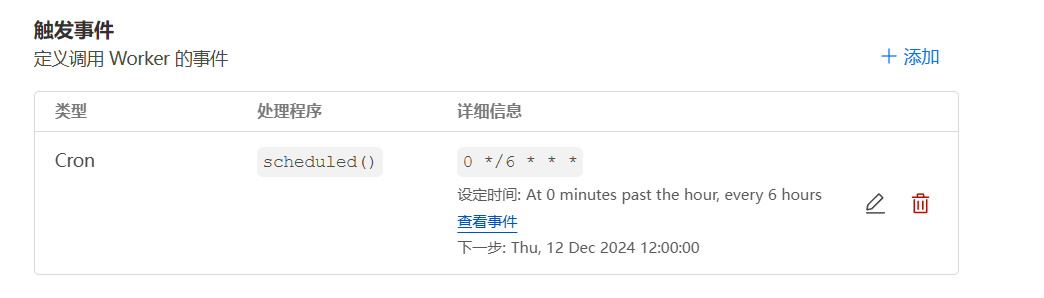
The password for accessing your Worker panel- Add Cron
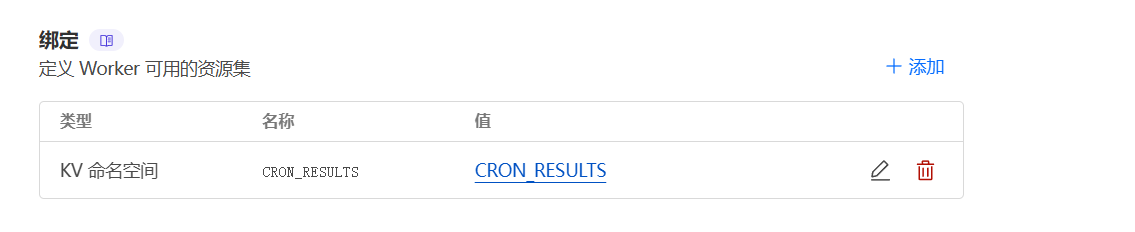
- Create a KV variable named
CRON_RESULTS - Go back to the Worker page you created earlier and bind the KV namespace
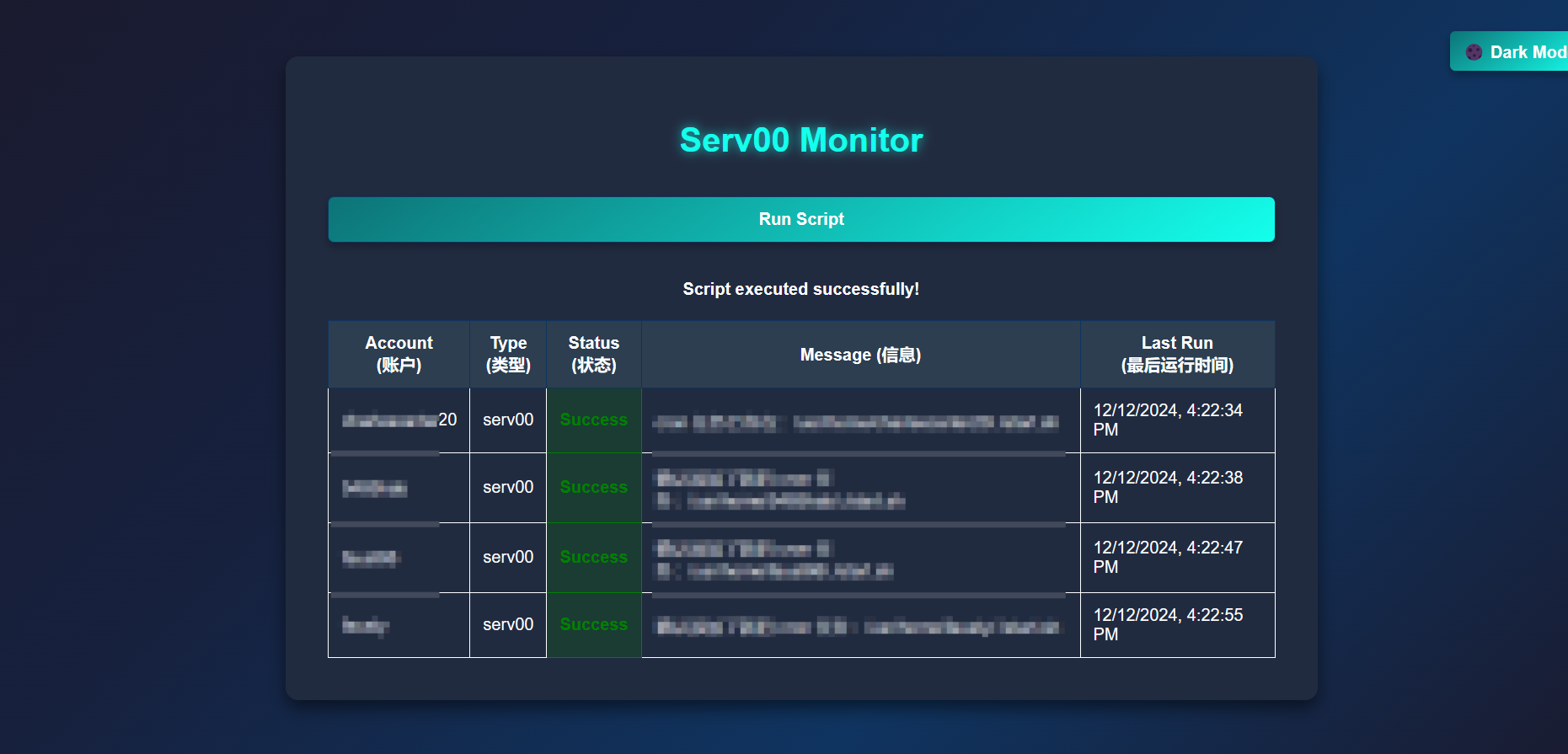
- Visit your Worker site, enter the password, and click
Run Script
- Reference: https://linux.do/t/topic/181957