
This article is translated from the Chinese original.
1. Install lib32stdc++6 to support 32-bit programs
- Command:
sudo apt-get install lib32stdc++6
lib32stdc++6 is a 32-bit version of the C++ standard library. It is mainly used to run applications on 64-bit Ubuntu systems that require 32-bit library support. Why install it? Because Steam on Linux is still 32-bit.
2. Download, extract, run, and log in to Steam
(If some commands do not have permission, add sudo in front.)
cd /usr/local/(switch to this directory)mkdir steamcmd(create asteamcmdfolder)cd steamcmd/(switch into the folder you just created)wget https://steamcdn-a.akamaihd.net/client/installer/steamcmd_linux.tar.gz(downloadsteamcmd)tar -zxvf steamcmd_linux.tar.gz(extract it)./steamcmd.sh(runsteamcmd)
After installation, you will see a steam> prompt, which means you have entered the console version of Steam.
Log in like this:
(If my account is 114514 and the password is 1919810)
Then enter:
login 114514 1919810
If you have a Steam token, you also need to enter the token.
3. Download Project Zomboid
After logging in successfully, enter:
app_update 380870 validate
(Sometimes it may not complete in one go because of network issues. If that happens, just run the command again.)
After the download finishes, enter:
exit
Exit SteamCMD.
- Enter:
tmux
Enter tmux.
(Use tmux to keep the process alive.)
Then enter:
cd ~
Then:
cd Steam/steamapps/common/cd Project\ Zomboid\ Dedicated\ Server/
Finally:
./start-server.sh
Start the server.
Later it will ask you to set a password for the Zomboid server. You need to enter it twice. Set it yourself.
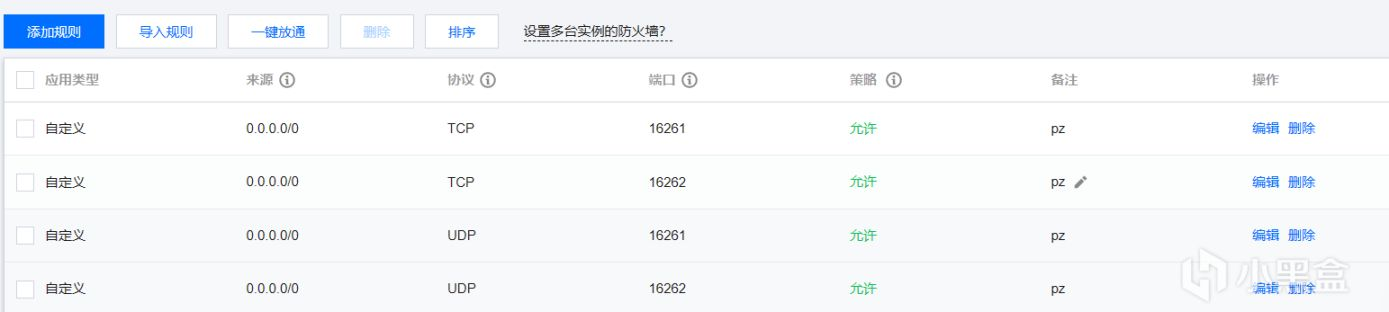
If you cannot connect to the server after startup, the most likely reason is that you did not open the required ports. Open them in your cloud server firewall. Tencent Cloud is used as the example here.
4. How to update it
-
(1) Start
steamcmd -
/usr/local/steamcmd/steamcmd.sh -
(2) Log in
login username password token
-
(3) Update
-
app_update 380870 validate
5. How to add mods
First prepare a server configuration file, for example:

It is saved by default at this path:
C:\Users\XXXX\Zomboid\Server
You can also see the path during configuration. Then replace the server-side configuration file with this one. When you start the server again, it will load the mods by itself.